[컴퓨터 이야기] 파일을 실수로 지웠을 때[Computer Stories] When You Accidentally Delete a File
FREEWAYFREEWAY·2026년 7월 28일July 28, 2026·4분 읽기4 min read
휴지통에 들어간 파일을 꺼내는 건 다들 안다. 여기서는 그 다음 이야기를 한다.
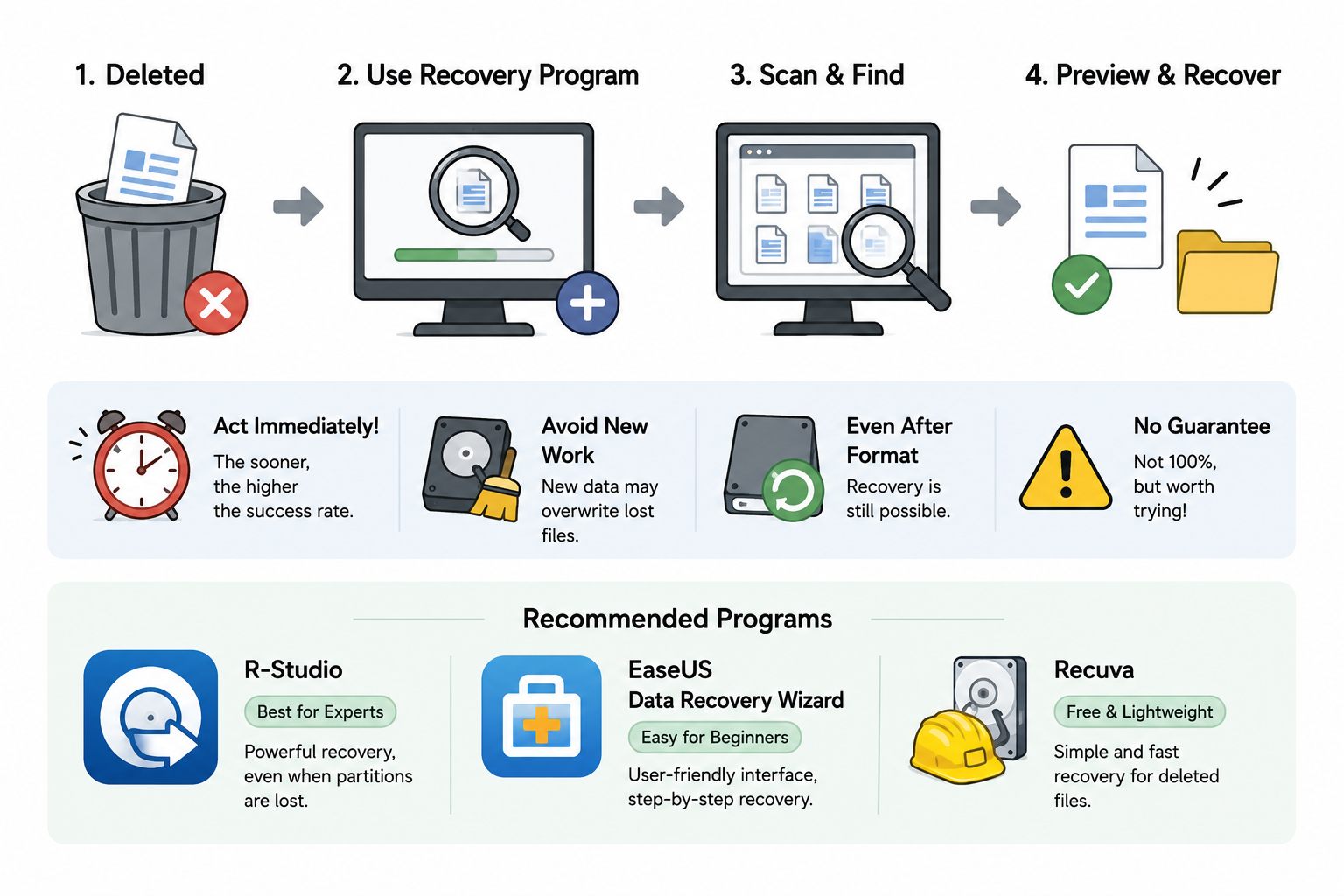
Shift+Delete로 영구 삭제했거나, 휴지통을 비운 뒤에도 파일을 살릴 수 있는 경우가 있다. 운영체제가 파일을 지울 때 내용을 바로 없애는 게 아니라 "이 자리를 써도 된다"는 표시만 하기 때문이다. 새로운 데이터가 그 자리를 덮어쓰기 전까지는 복구할 가능성이 있다.
삭제 직후 컴퓨터를 최대한 적게 쓸수록 성공률이 올라간다. 파일을 지운 걸 알았다면 바로 복구를 시도해야 한다. 시간이 지날수록, 새 파일을 저장할수록 빈 자리가 덮어씌워져 복구가 어려워진다.
Shift+Delete를 조심하자
일반 Delete 키로 지우면 휴지통으로 이동해 복원할 수 있다. 그런데 Shift+Delete는 휴지통을 건너뛰고 바로 영구 삭제한다. 빠르게 지우려다 이 조합을 누른 경우라면 복구 프로그램을 써야 한다.
포맷한 드라이브도 복구된다
드라이브를 포맷했더라도 빠른 포맷(Quick Format)이라면 대부분의 파일을 살릴 수 있다. 빠른 포맷은 파일 목록만 지우고 실제 데이터는 건드리지 않기 때문이다. 전체 포맷(Full Format)이나 파티션이 손상된 경우에도 전문 복구 프로그램으로 상당 부분 복구된다.
어떤 프로그램을 쓸까
시중에 복구 프로그램이 많지만 크게 세 가지가 검증됐다.
R-Studio — 가장 강력한 전문가용 도구. 파티션 손상, 포맷, RAID까지 복구 가능. 유료지만 복구 가능 여부는 무료로 미리 확인할 수 있다.
EaseUS Data Recovery Wizard — 인터페이스가 직관적이고 초보자도 쓰기 쉽다. 일정 용량까지 무료, 이후 유료.
Recuva — CCleaner 개발사(Piriform)가 만든 무료 도구. 가볍고 간단한 삭제 복구에 충분하다. 복잡한 상황에서는 위 두 가지보다 약하다.
단순 실수 삭제라면 Recuva로 시작해보고, 포맷이나 파티션 손상까지 엮였다면 R-Studio나 EaseUS를 쓰는 게 낫다.
랜섬웨어는 복구 프로그램으로 안 된다
랜섬웨어에 감염되면 파일이 암호화되는데, 이건 삭제가 아니라 내용 자체가 바뀐 것이다. 복구 프로그램은 파일의 내용을 바꾸는 게 아니라 지워진 위치를 찾아내는 도구라 랜섬웨어에는 소용이 없다.
랜섬웨어로 잠긴 파일은 복호화 키가 있어야 풀린다. 해당 랜섬웨어 변종에 맞는 복호화 도구가 공개됐는지 확인해보는 것이 먼저다. 디지털 포렌식 전문 업체도 복호화 키 없이는 내용을 복원하지 못한다.
Most people know you can restore a file from the Recycle Bin. This is about what happens after that's no longer an option.
Files deleted with Shift+Delete or after emptying the Recycle Bin can often still be recovered. When Windows deletes a file, it doesn't immediately erase the data — it just marks that space as available to be overwritten. Until something else writes to that location, recovery is possible.
The less you use the computer after deleting the file, the better your chances. If you realize you've deleted something important, stop what you're doing and attempt recovery immediately. Every new file you save risks overwriting the space where your deleted data still lives.
Watch out for Shift+Delete
Pressing Delete moves a file to the Recycle Bin, where it can be easily restored. Shift+Delete bypasses the Recycle Bin entirely and permanently removes the file in one step. If you've done this accidentally, you'll need recovery software to get it back.
Formatted drives can be recovered too
If you've formatted a drive, there's still a good chance the files are recoverable — especially if you used Quick Format. Quick Format only wipes the file index; the actual data remains untouched underneath. Even after a Full Format or partition corruption, professional recovery software can often retrieve a significant portion of the data.
Which program to use
There are many recovery tools out there, but three stand out as reliable:
R-Studio — The most powerful option and the choice of professionals. Handles partition damage, full formats, and even RAID recovery. It's paid software, but you can scan and preview recoverable files for free before purchasing.
EaseUS Data Recovery Wizard — Beginner-friendly with a clean, intuitive interface. Free up to a certain recovery size, then paid.
Recuva — A free tool from Piriform (the CCleaner developers). Lightweight and straightforward — more than enough for simple accidental deletions. Less capable than the other two in complex scenarios.
For a straightforward accidental deletion, start with Recuva. If you're dealing with a formatted drive or partition damage, R-Studio or EaseUS will serve you better.
Ransomware is a different problem entirely
When ransomware infects a computer, it encrypts your files — it doesn't delete them. Recovery software works by locating data that still exists at a deleted file's old address; it has no ability to decrypt content that has been scrambled by ransomware.
Files locked by ransomware require a decryption key to be restored. Your best starting point is to check whether a decryption tool has been released publicly for the specific ransomware variant that hit you. Even professional digital forensics teams cannot recover ransomware-encrypted files without the corresponding key.
댓글Comments