바코드 가리기 · 이미지 마스킹 Barcode redact · Image mask
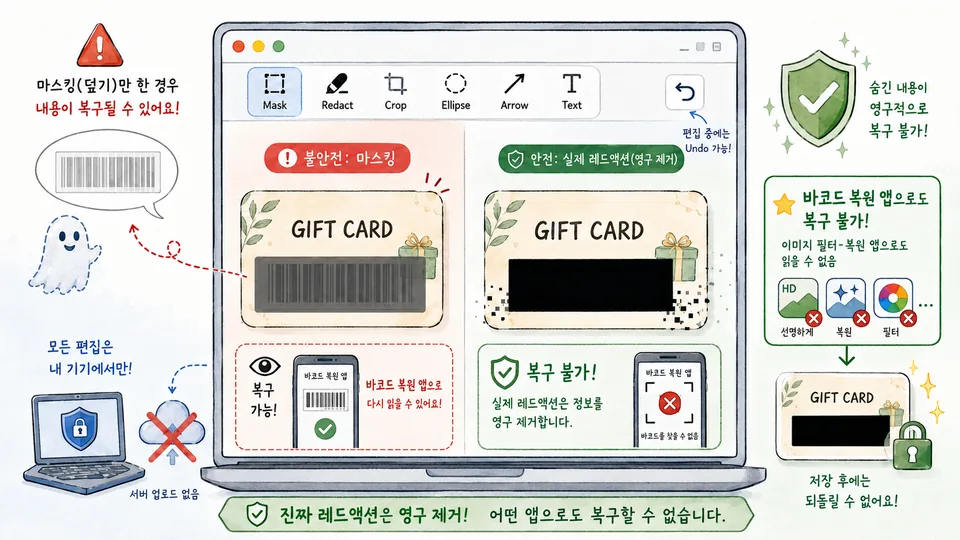
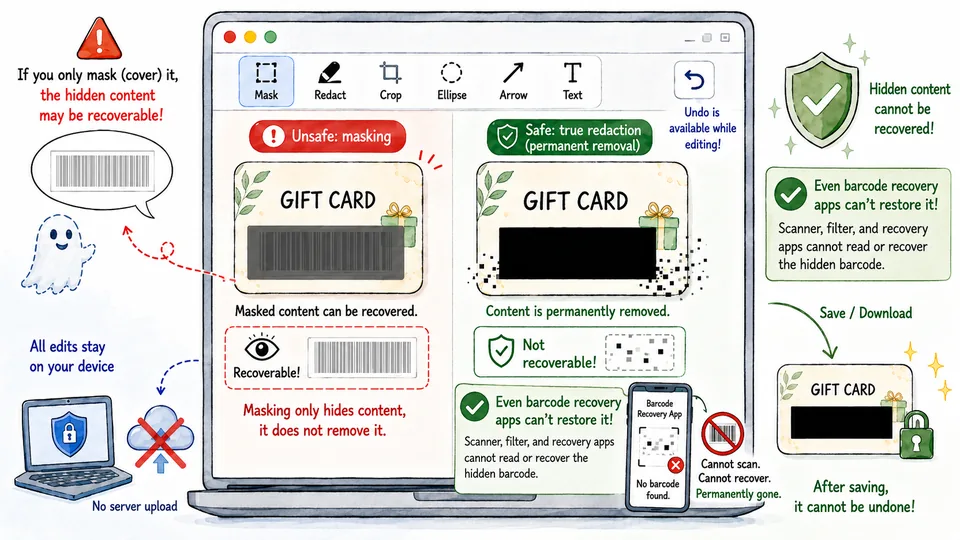
상품권·기프트카드·쿠폰 바코드, 개인정보 마스킹, 문서 편집. 가리기는 덧칠이 아니라 픽셀 소각이라 다운로드 후 복원 불가. 서버 업로드 없음. Gift card / coupon barcode redact, personal info masking, document editing. Burn-in, not overlay — pixels are deleted, unrecoverable after download. Nothing uploaded.
PDF가 필요하면 PDF 마스킹 · 페이지 추출을 쓰세요. For PDFs, use PDF mask · page extract.
사용 방법How to use
-
1
이미지 열기Open image
드래그·클릭 또는 Ctrl+V 클립보드 붙여넣기. JPEG·PNG·GIF·BMP·WebP 지원.Drag & drop, click to browse, or Ctrl+V paste from clipboard. JPEG·PNG·GIF·BMP·WebP.
-
2
가리기 · 편집Mask & annotate
검정·흰색 마스크(소각), 자르기, 타원, 화살표, 텍스트. 선택 후 이동·크기·회전 가능.Black/white burn-in mask, crop, oval, arrow, text. Select to move, resize, rotate.
-
3
다운로드Download
출력 형식(JPEG·PNG·WebP)·품질·크기를 선택해 저장. 서버 전송 없음.Choose format (JPEG·PNG·WebP), quality & size, then save — nothing sent to any server.
이 도구의 장점Why this tool
이미지가 서버로 전송되지 않습니다. 인터넷 연결 없이도 동작.Images never leave your device — works entirely in the browser, even offline.
단순히 덮는 게 아닌 픽셀 삭제. 이미지 편집 앱으로도 되돌릴 수 없습니다.Pixels are deleted, not covered. Unrecoverable even with image-processing tools.
JPEG·PNG·WebP 자유 변환, 품질·크기(최대 25%) 조절로 용량 줄이기.Convert to JPEG/PNG/WebP, adjust quality, and downscale up to 25% to reduce file size.
타원(손그림 스타일)·화살표·텍스트 주석. Snagit 스타일 마킹.Hand-drawn oval, arrow, text — Snagit-style marking for reports and docs.
바코드·개인정보 가리기, 사진에서도 소각으로 Redact barcodes and private details—burned into the pixels
이 페이지는 사진·스크린샷에서 상품권·기프트카드 바코드, 얼굴·주소·계좌 같은 민감 정보를 픽셀 소각으로 가리는 이미지 마스킹 도구입니다. 검정·흰색 마스크뿐 아니라 자르기, 타원, 화살표, 텍스트 주석도 지원하며, JPEG·PNG·WebP로 저장·압축할 수 있습니다. 이미지는 서버로 전송되지 않습니다.
사용법
- 이미지를 끌어다 놓거나 클릭해 엽니다.
- 마스크 도구로 바코드·개인정보 영역을 드래그해 소각합니다. 필요하면 자르기·타원·화살표·텍스트로 표시합니다.
- 선택한 도형은 이동·크기·회전할 수 있습니다.
- 출력 형식·품질·크기를 고른 뒤 다운로드합니다.
왜 '소각'인가
미리보기나 메모 앱에서 반투명으로만 가린 상품권 사진을 공유하면, 아래에 바코드가 남아 복원·필터로 다시 읽히는 사기가 있습니다. 이 도구는 덮는 레이어가 아니라 픽셀을 삭제하므로, 내보낸 파일에서는 일반적인 이미지 편집으로도 되돌리기 어렵습니다. PDF 안 바코드는 PDF 마스킹을 쓰세요.
이런 때 쓰기 좋습니다
- 상품권·문화상품권·기프트카드: 바코드·PIN을 가린 뒤 메신저·SNS에 올릴 때.
- 증빙·영수증 사진: 카드 번호·주소만 가리고 금액·상호는 남길 때.
- 보고서·이슈 캡처: 화살표·타원·텍스트로 문제 지점을 표시할 때.
- 용량 줄이기: WebP·품질·해상도 조절로 첨부 용량을 낮출 때.
처리는 브라우저 안에서만 이뤄지며 업로드되지 않습니다. 소각한 영역은 저장 후 복원할 수 없으니 원본은 따로 보관하세요. 너무 큰 원본은 기기 성능에 따라 느려질 수 있습니다.
This page redacts gift-card barcodes and private details (faces, addresses, accounts) with pixel burn-in on photos and screenshots. Besides black/white masks you get crop, oval, arrow, and text, plus JPEG/PNG/WebP export and compression. Images never leave your browser.
How to use
- Drag & drop or click to open an image.
- Drag a mask over barcodes or private areas; add crop, oval, arrow, or text as needed.
- Select shapes to move, resize, or rotate.
- Pick format, quality, and size, then download.
Why burn-in
Semi-transparent covers in preview apps often leave barcodes recoverable. Here pixels are deleted, not covered, so typical image tools cannot restore them from the export. For barcodes inside a PDF, use PDF mask.
Good uses
- Gift cards & coupons: hide barcodes/PINs before chat or social posts.
- Receipts & proofs: redact card numbers or addresses while keeping totals.
- Bug reports: mark issues with arrows, ovals, and captions.
- Smaller attachments: WebP, quality, and downscale cut file size.
Everything runs locally; nothing is uploaded. Burned areas cannot be restored after save—keep a separate original. Very large images may feel slow on modest devices.