PDF 마스킹 · 페이지 추출 PDF mask · page extract
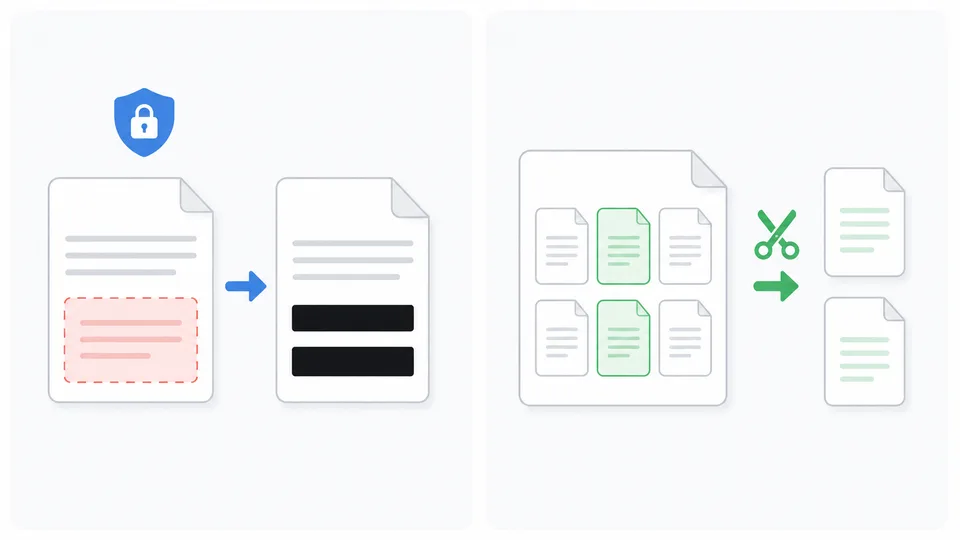
민감 정보를 드래그로 가립니다. 가리기는 덧칠이 아니라 소각(burn-in)이라 저장 후 원문을 되돌릴 수 없습니다. 파일은 서버로 보내지 않습니다. Black out sensitive areas. Masking is burn-in, not an overlay — original content cannot be restored after save. Files never leave your browser.
가리기는 픽셀 소각입니다(레이어 아님). 다운로드한 PDF에서는 가린 영역을 되돌릴 수 없습니다. 마스킹 없는 페이지만 원본 벡터를 유지합니다. Masking is pixel burn-in (not a removable layer). Redacted regions cannot be restored from the downloaded PDF. Unmasked pages keep original vector content.
사용 방법How to use
-
1
PDF 열기Open PDF
드래그·클릭으로 PDF를 엽니다. 브라우저에서 직접 렌더링, 별도 앱 불필요.Drag & drop or click to open. Rendered directly in the browser — no extra app needed.
-
2
마스킹 · 페이지 추출Mask & extract
드래그로 영역 마스킹(소각) 또는 필요한 페이지만 선택해 추출. 검정·흰색 마스크 선택 가능.Drag to mask (burn-in) or select pages to extract. Black or white mask supported.
-
3
다운로드Download
마스킹된 PDF 또는 추출한 페이지를 PDF로 저장. 서버 전송 없음.Save masked PDF or extracted pages — nothing sent to any server.
이 도구의 장점Why this tool
PDF가 서버로 전송되지 않습니다. 민감 문서도 안심하고 편집.Your PDF never leaves your device — safe for confidential documents.
반투명 레이어가 아닌 픽셀 삭제. 텍스트·이미지 복원 불가.Not an overlay layer — pixels are deleted. Text and images cannot be recovered.
필요한 페이지만 선택해 별도 PDF로 저장. 대용량 PDF 분할에도 유용.Select specific pages to save as a new PDF — great for splitting large documents.
브라우저만 있으면 됩니다. Acrobat·별도 앱 없이 바로 사용.Works in any modern browser. No Acrobat or extra software needed.
PDF 마스킹과 페이지 추출, 왜 로컬이어야 할까 PDF masking and page extract—why local matters
이 페이지는 브라우저 안에서 PDF의 민감 영역을 소각(burn-in) 마스킹하거나, 필요한 페이지만 골라 새 PDF로 추출하는 도구입니다. 파일이 서버로 올라가지 않으며, 마스킹된 페이지는 이미지로 구워져 아래 텍스트·객체가 결과에 남지 않습니다. 계약서 일부만 공유하거나, 주민번호·계좌·바코드를 가린 뒤 보내야 할 때 쓰기 좋습니다.
사용법
- PDF를 끌어다 놓거나 클릭해 엽니다. (대략 20MB·50페이지까지)
- 마스킹 탭에서 드래그로 영역을 가립니다. 검정·흰색 마스크를 고를 수 있습니다.
- 페이지 추출 탭에서 필요한 페이지만 선택해 별도 PDF로 저장합니다.
- 작업이 끝나면 다운로드합니다. 원본 파일은 이 기기에만 있습니다.
덧칠과 소각의 차이
메모·미리보기에서 반투명으로만 가리면, 아래에 글자나 바코드가 남아 필터·복원 앱으로 다시 읽히는 경우가 있습니다. 이 도구의 가리기는 레이어 덧칠이 아니라 픽셀을 지우는 방식이라, 내보낸 PDF에서는 그런 식으로 되돌리기 어렵습니다. 마스킹이 없는 페이지만 원본 벡터를 유지합니다.
이런 때 쓰기 좋습니다
- 계약·견적서: 일부 조항·단가만 남기고 나머지를 가린 채 공유할 때.
- 증명서·서류: 주민번호·계좌·연락처를 가린 사본이 필요할 때.
- 자료 분할: 긴 PDF에서 발표용·제출용 페이지만 따로 뽑아 둘 때.
- 상품권·쿠폰 PDF: 바코드·PIN을 가린 뒤 화면 공유·첨부할 때. (사진은 이미지 마스킹)
처리는 전부 이 브라우저에서 이뤄지며 업로드되지 않습니다. 가린 영역은 저장 후 복원할 수 없으니, 원본은 따로 보관하세요. 최대 용량·페이지 수는 기기 성능에 따라 달라질 수 있습니다.
This page lets you burn-in mask sensitive areas of a PDF or extract selected pages into a new file—entirely in the browser. Nothing is uploaded. Masked pages are rasterized so underlying text and objects do not survive in the export. Use it when you must share only part of a contract, or hide IDs, accounts, and barcodes before sending.
How to use
- Drag & drop or click to open a PDF (about 20 MB / 50 pages).
- On the Mask tab, drag rectangles; choose black or white fill.
- On Extract pages, tick the pages you need and save a new PDF.
- Download when done. The original stays on your device only.
Overlay vs burn-in
Semi-transparent covers in preview apps often leave the barcode or text underneath recoverable. Here masking deletes pixels, not a removable layer, so recovery from the exported file is far harder. Pages without masks keep their original vectors.
Good uses
- Contracts & quotes: share only the clauses or prices that matter.
- Certificates & forms: redact ID numbers, accounts, and phone numbers.
- Splitting decks: pull presentation or submission pages from a long PDF.
- Gift-card PDFs: hide barcodes/PINs before screen-share. (Photos: Image mask)
Everything runs locally; nothing is uploaded. Masked areas cannot be restored after save—keep a separate original. Size and page limits may vary by device.