압축을 풀고 faIpScanner.exe를 실행하면 바로 사용할 수 있다. 설치 과정이 없는 포터블 프로그램이다.
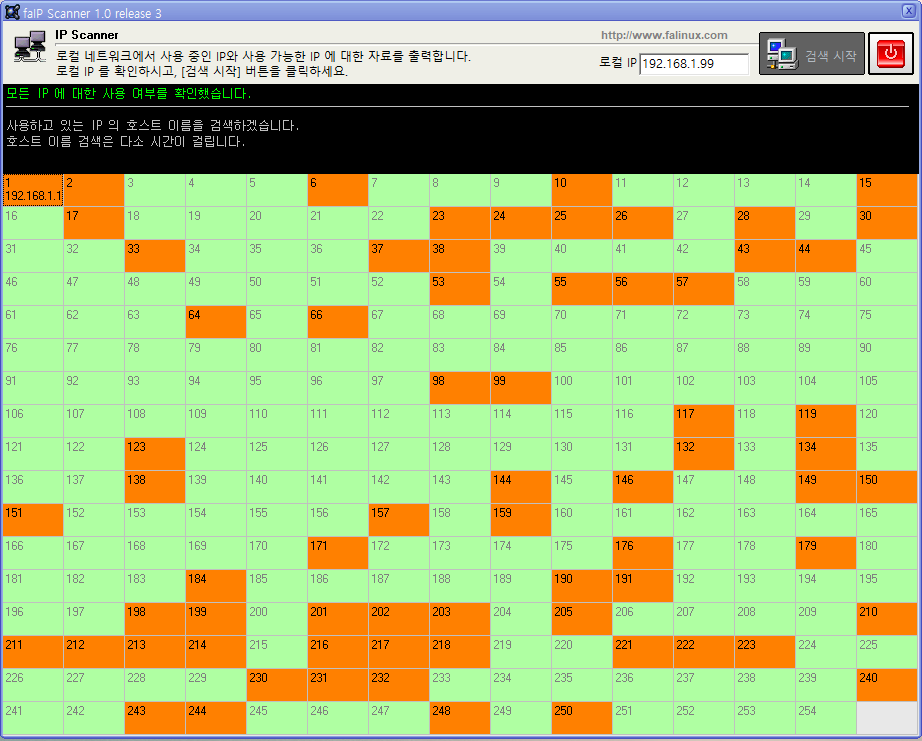
스캔할 IP 범위를 입력하고 시작하면 수 초 안에 결과가 표시된다. 회사 IP 대역이 192.168.1.x라면 시작 IP에 192.168.1.1, 끝 IP에 192.168.1.254를 입력하면 된다.
There are times on a company network when you need to know what's going on with IP addresses.
Maybe you're adding a new device and need to find a free address. Maybe there's an IP conflict and you want to know if two machines are claiming the same one. Or you simply need to know what IP a particular PC is using. You can piece this together with PING and NETSTAT, but scanning an entire address range that way is tedious.
faIpScanner is a free tool built exactly for this. Point it at an IP range, run the scan, and within seconds you have a clear list of active addresses, hostnames, and the gaps where addresses are free.
What it does
Scans a specified IP range automatically
Shows active IPs alongside their hostnames (computer names)
Makes unused address ranges immediately obvious
No installation required — portable executable
When it comes in handy
Finding a free IP before registering a new device or printer
Diagnosing IP conflicts — spotting two devices sharing an address
Getting a quick inventory of everything connected to the local network
Locating a PC's IP when you only know its hostname
Unzip and run faIpScanner.exe — no installation needed. Enter the start and end of the IP range you want to scan and hit start. If your network uses 192.168.1.x, enter 192.168.1.1 as the start and 192.168.1.254 as the end.
댓글Comments