[컴퓨터 이야기] Gmail 아이디 변경이 가능해졌다[Computer Stories] You Can Now Change Your Gmail Address
FREEWAYFREEWAY·2026년 7월 26일July 26, 2026·4분 읽기4 min read
이메일이 뭔지는 굳이 설명하지 않아도 될 것이다.
국내 인터넷 초창기를 기억하는 사람이라면 다음(Daum)과 네이버를 함께 떠올릴 것이다. 예전에는 네이버가 다음 앞에서 이름도 제대로 못 내밀던 시절이 있었다. 다음 카페와 한메일(Daum 메일)이 워낙 강해서였다.
그런데 그 잘나가던 다음이 기울기 시작한 데는 이유가 있었다. 온라인 우편요금제다. 무료로 쓰던 이메일에 돈을 받으려 했던 시도. 당연히 사용자들은 등을 돌렸고, 한번 나간 사람은 돌아오지 않았다. 그 이후에도 잘 되던 서비스를 이유 없이 없애는 등 삽질을 반복하면서 지금의 위치가 됐다.
서비스를 유지하고 사용자를 붙잡아두는 것이 얼마나 어려운지를 잘 보여주는 사례다.
Gmail도 처음엔 초대장이 있어야 했다
구글이 Gmail 서비스를 시작하기 전, 이메일 계정을 만들려면 어딘가에 가입하거나 지인의 초대를 받아야 하는 경우도 있었다. Gmail도 초창기에는 초대장 시스템을 운영했다. 누군가에게 초대장을 받아야 가입할 수 있었던 것이다. 지금 생각하면 낯설지만, 당시에는 초대장 자체가 일종의 희소성이 됐다.
이제는 아이디 자체를 바꿀 수 있다
Gmail 계정에서 @gmail.com 앞의 아이디는 한번 만들면 바꿀 수 없는 것으로 알려져 있었다. 물론 새 계정을 만들어 메일을 통째로 가져오는 꼼수 같은 방법이 있긴 했지만, 공식 기능은 아니었다.
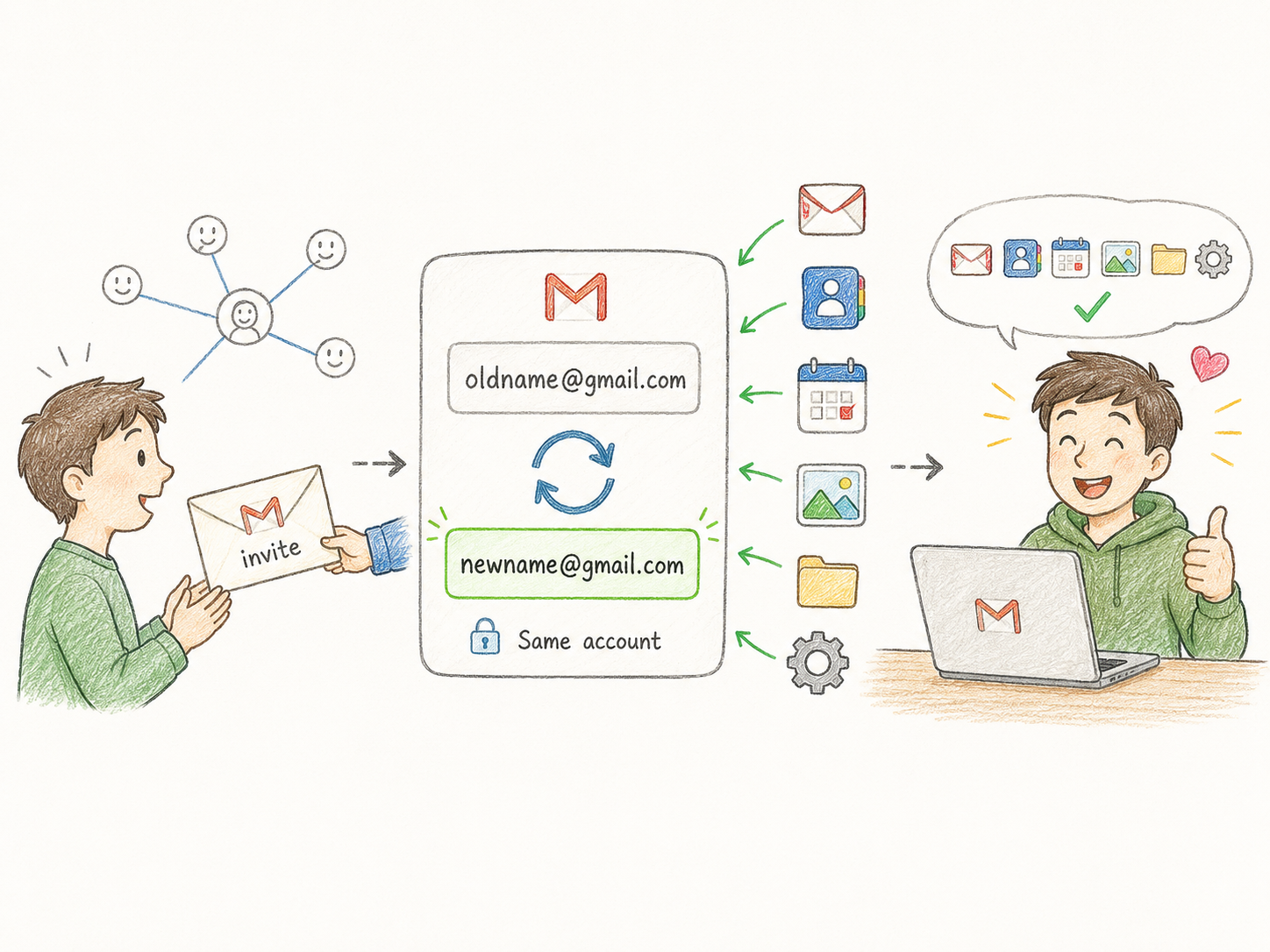
그런데 얼마 전 구글이 공식적으로 기존 데이터를 유지하면서 Gmail 주소 자체를 변경하는 기능을 도입했다.
변경 규칙과 제한
연 1회 제한 — 새 Gmail 주소 생성은 12개월에 딱 1번만 가능하다.
평생 최대 3회 — 계정 수명 동안 총 세 번까지만 바꿀 수 있다.
기존 주소는 보조 주소로 유지 — 변경 후에도 기존 아이디는 삭제되지 않고 내 계정의 별칭(alias)으로 등록된다. 기존 주소로 오는 메일도 계속 수신되고, 기존 주소로 로그인도 된다.
외부 서비스 재연동 필요 — 구글 주소로 가입된 타사 서비스(구글로 로그인 등)나 크롬북 설정 등 일부는 변경 후 재설정이 필요할 수 있다. 변경 전에 어디 연동되어 있는지 미리 파악해두는 것이 좋다.
그래도 개인적으로는 추천하지 않는다
개명을 한번 해본 사람은 알 것이다. 공식적으로는 이름이 바뀌었는데, 예상치 못한 곳에서 예전 이름을 요구하거나 연결이 끊기는 일이 생긴다. 이메일 주소도 비슷하다.
특히 오랫동안 써온 주소일수록 연동된 서비스가 많고, 그걸 일일이 파악하고 바꾸다 보면 생각보다 번거롭다. 기존 주소가 별칭으로 유지된다고 해도, 그게 언제까지 보장되는지는 알 수 없다.
꼭 필요한 이유가 있다면 모르겠지만, 단순히 마음에 들지 않는다는 이유만으로 바꾸는 건 권하지 않는다.
Email doesn't need much introduction.
Those who remember the early days of the Korean internet will recall Daum and Naver as the two giants of the era. Back then, Naver barely registered next to Daum — Daum Café and Hanmail (Daum's email service) were simply dominant.
But then Daum made a critical mistake: it tried to charge for what had been a free email service — a move sometimes called the "online postage" scheme. Users left immediately, and once people leave a platform, they rarely come back. A string of other bad calls followed — killing off popular services without explanation — and Daum's position has been declining ever since.
It's a useful reminder of how hard it is to hold on to users once you've lost their trust.
Gmail started with invite codes
Before Gmail launched, getting a new email account meant visiting a site and signing up — or, in some cases, waiting for an invitation. Gmail itself launched as an invite-only service. To sign up, you needed someone to send you an invite. It sounds strange now, but at the time those invitations were genuinely scarce, and getting one felt like a small privilege.
Now you can change your Gmail username
The username before @gmail.com has always been considered permanent. There were workarounds — creating a new account and importing everything over — but nothing official.
Google has recently introduced an official feature that lets you change your Gmail address while keeping all your existing data intact.
Rules and limits
Once per year — You can create a new Gmail address only once every 12 months.
Lifetime maximum of 3 changes — You can only change it three times across the life of the account.
Old address stays as an alias — After the change, your old address isn't deleted. It becomes a secondary alias on your account — mail sent to the old address still arrives, and you can still log in with it.
Some third-party services will need reconnecting — Apps where you signed in with Google, Chromebook settings, and similar integrations may require reconfiguration after the change. It's worth auditing where your address is linked before you change it.
My honest take: don't bother
Anyone who has legally changed their name knows what it's like: everything is officially updated, but unexpected loose ends keep appearing — old forms, old IDs, services that don't know about the new name.
An email address change is similar. The longer you've had it, the more services are connected to it, and tracking them all down is more work than it sounds. The fact that the old address stays as an alias helps, but there's no guarantee of how long that protection lasts.
If you have a specific reason that makes the change necessary, that's one thing. But changing it just because you've never liked your old username? Probably not worth the hassle.
댓글Comments